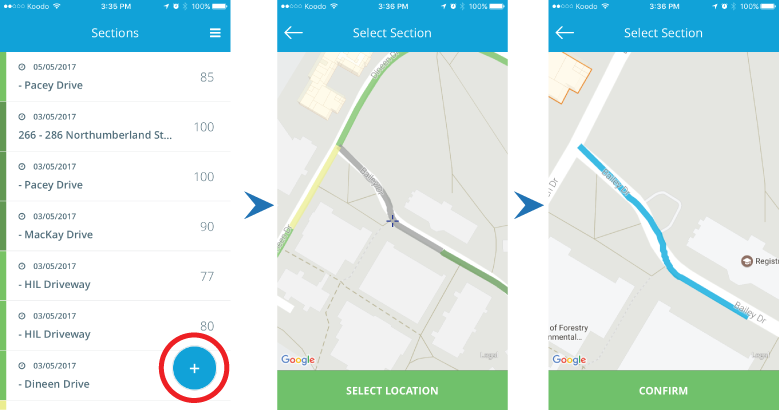
Begin your PCI survey by selecting the section you would like to survey from the app's map screen by following these steps:
- Press the “+” button from the main screen
- Drag the map so the crosshair is on top of the section you would like to survey, black lines are lines that have not been surveyed
- Press the “Select Location” at the bottom of the screen
- Ensure you have selected the correct section, press “Confirm”
- If this is the first time you have surveyed the section you will be prompted to input the section’s width and section material. Measure width of the road, and choose ACC for ashpalt or PCC for concrete then press “Ok”
Note, selecting a section from the map will create a new survey. To access data from a previous survey, use the Search bar on the main screen of the app.